Launching an eCommerce site means building a functional online store that attracts customers, processes orders, and supports your business operations from day one. Over 53% of customers prefer digital engagement with businesses, which means your online store is no longer optional. It is your primary sales channel. This guide walks you through every critical step, from choosing a platform to marketing your store after launch, so you can build with confidence and avoid the mistakes that stall most new stores.
What do you need before launching an eCommerce site?
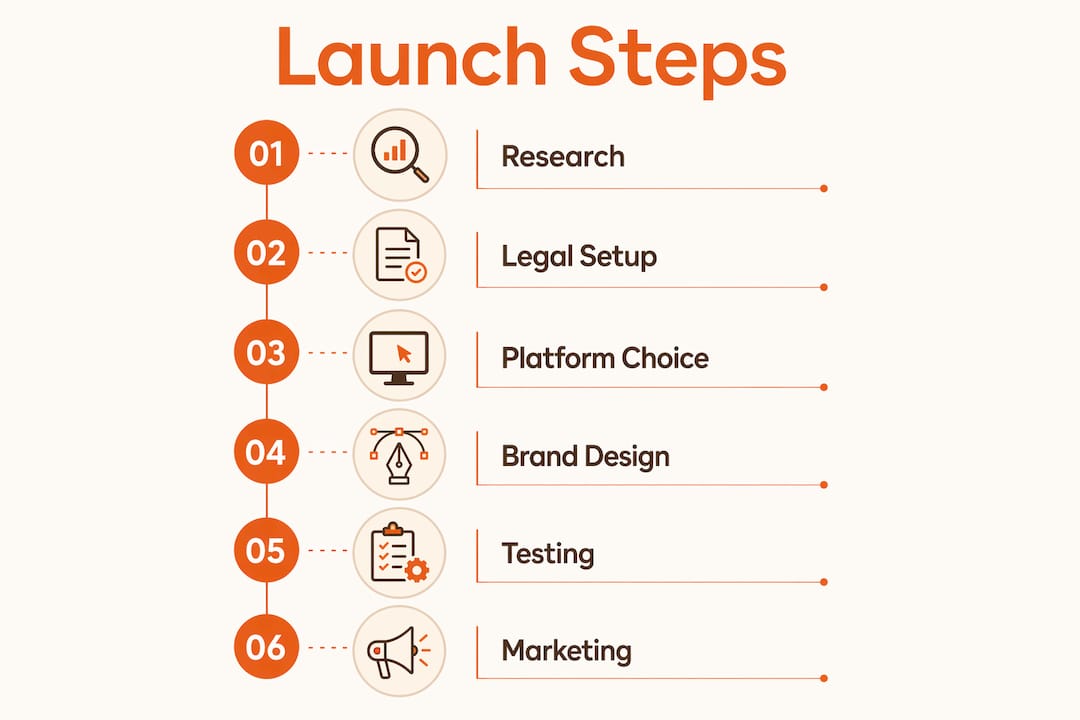
The foundation of a successful eCommerce business setup is preparation. Skipping this phase is the most common reason new stores fail within the first year.
Start with market research. Define your niche clearly. Know who your customer is, what they need, and which competitors already serve them. A narrow, well-defined niche outperforms a broad, unfocused one every time.
Next, handle your legal and financial structure. Register your business as an LLC or sole proprietorship, open a dedicated business bank account, and set up accounting software early. Financial experts advise separating personal and business finances from the start to avoid tax and liability complications. QuickBooks is a widely used option for small eCommerce businesses.
Then choose your platform. Platform selection directly affects your user experience and day-to-day operations. Here is a comparison of the three most common options:

| Platform | Best For | Starting Cost | Key Strength |
|---|---|---|---|
| Shopify | Beginners and growing brands | ~$39/month | Ease of use, app ecosystem |
| WooCommerce | WordPress users, custom builds | Free plugin, hosting varies | Flexibility, ownership |
| Wix | Very small stores, low budgets | ~$17/month | Simple drag-and-drop setup |
Finally, register a domain name that matches your brand. Keep it short, easy to spell, and free of numbers or special characters. Your domain is part of your brand identity, so treat it as seriously as your logo.
- Conduct market research and define your niche
- Register your business and open a business bank account
- Choose an eCommerce platform based on budget and features
- Register a brand-aligned domain name
- Set up accounting software before your first sale
How to build your store’s brand identity and design.
A well-defined brand identity builds customer trust and sets your store apart in competitive markets. Before you touch a single product page, get your brand foundations in place. This means a logo, a consistent color palette, and a clear brand voice that speaks directly to your customer. Founders who build brand before website consistently see stronger launch results.
Once your brand is defined, apply it across your store design. Choose a theme or layout that reflects your brand’s personality and makes navigation intuitive. Cluttered layouts kill conversions. Customers should be able to find a product, read about it, and check out in three clicks or fewer.
Product presentation matters more than most new store owners expect. Write product descriptions that answer the customer’s real question: “Will this solve my problem?” Use plain language, highlight key benefits in the first sentence, and include dimensions, materials, or specifications where relevant. Pair every product with high-quality images shot from multiple angles.
Integrate payment gateways like PayPal and Stripe during setup. Both are widely trusted by online shoppers and take minutes to connect on Shopify or WooCommerce. Configure your checkout to minimize steps and remove any friction that could cause a customer to abandon their cart.
Store setup checklist:
- Logo, color palette, and brand fonts applied consistently
- Navigation menu organized by product category
- Product pages with descriptions, images, and pricing
- Payment gateways connected and tested
- SSL certificate active (required for secure checkout)
- Contact page and return policy published
Pro Tip:
Mobile-first design directly improves customer engagement and sales. Build and review your store on a phone before you launch, not after.
How to prepare for launch: testing, compliance, and fulfillment.
A store that breaks during checkout loses customers and credibility. Pre-launch testing is not optional. It is the work that separates a professional store from an amateur one.
Run through these steps before you go live:
- Test site speed. Slow pages drive customers away. Use Google PageSpeed Insights to check load times on both desktop and mobile.
- Walk through the full checkout flow. Place a test order yourself. Confirm that payment processes, confirmation emails send, and order data appears in your dashboard.
- Check mobile responsiveness. Resize your browser or use a real phone to verify that every page displays correctly.
- Review compliance requirements. Confirm you are collecting sales tax in the states where you have nexus. Publish a clear return policy and privacy policy before launch.
- Set up shipping. Choose carriers like UPS, FedEx, or USPS. Define your shipping rates, delivery windows, and any free shipping thresholds.
Soft launches help identify site issues early and improve customer experience before wide release. Share your store with a small group of trusted customers or colleagues first. Their feedback will surface problems you missed during internal testing
Pro Tip:
Install Google Analytics and Google Search Console before your launch date. Tracking customer behavior from day one gives you data to act on immediately, rather than guessing what is working.
What marketing strategies work best for a new eCommerce site?
Traffic does not appear automatically after launch. You need a deliberate plan to bring customers to your store and keep them coming back.
SEO best practices improve product page rankings and drive organic traffic over time. Write unique title tags and meta descriptions for every product page. Use the exact words your customers type into Google. Internal linking between related products and blog posts also signals relevance to search engines. For a deeper look at what this means for online retailers, Expedition’s guide on eCommerce SEO covers the fundamentals clearly.
Paid marketing like PPC and social ads accelerates visibility for new stores that cannot wait months for organic traffic to build. Google Shopping ads and Meta ads both allow precise audience targeting. Set a modest daily budget, test two or three ad variations, and cut what does not convert within two weeks.
Email marketing delivers strong returns for eCommerce businesses. Collect email addresses from day one using a simple signup offer, such as 10% off a first order. Send a welcome sequence, then follow up with product recommendations and promotions on a consistent schedule.
- Write unique SEO titles and descriptions for every product page
- Run Google Shopping and Meta ads with targeted audience settings
- Build an email list from launch day with a signup incentive
- Post consistently on the social platforms your customers actually use
- Review analytics weekly and adjust based on what the data shows
Ongoing site optimization is what separates stores that grow from stores that plateau. Your launch is the starting point, not the finish line.
Key Takeaways:
A successful eCommerce launch requires preparation, platform selection, brand clarity, pre-launch testing, and a marketing plan executed from day one.
| Point | Details |
|---|---|
| Prepare before you build | Register your business, separate finances, and define your niche before choosing a platform. |
| Choose the right platform | Shopify suits beginners; WooCommerce suits custom builds; both scale with your business. |
| Brand before design | A clear logo, color palette, and brand voice must be in place before you design a single page. |
| Test everything before launch | Check speed, checkout flow, mobile display, and compliance before your store goes live. |
| Market from day one | SEO, paid ads, and email marketing all need to start at launch, not weeks later. |
What I have learned from watching eCommerce launches go right and wrong.
The stores that struggle most are not the ones with the smallest budgets. They are the ones that launch without a plan and then try to fix everything at once.
The single most overlooked step is financial setup. Separating business finances early is critical to avoid tax and legal complications down the road. I have seen entrepreneurs six months into a growing store suddenly realize they cannot tell what their actual profit margin is because personal and business expenses are mixed together. That is a painful and avoidable problem.
The second mistake is overbuilding at launch. Starting simple with scalable tools lets you adapt and expand without costly overhauls later. You do not need 200 products, a custom app, and a loyalty program on day one. You need a clean store, five to ten strong products, and a checkout that works. Everything else can come after you have real customer data.
The third thing I keep coming back to is user experience. A beautiful store that confuses customers converts at the same rate as an ugly one. Invest time in eCommerce UX before you invest money in ads. If the store does not convert, more traffic just means more wasted spend.
Start simple. Test fast. Learn from real customers. Then scale what works.
How Expedition supports eCommerce businesses from build to growth.
Expedition is a Cincinnati-based web design and digital agency that builds eCommerce stores on WooCommerce and Shopify, with a focus on driving real sales rather than just looking good. The same in-house team that designs your eCommerce website also handles your branding, SEO, and paid ad campaigns, so nothing gets handed off or lost in translation. Expedition also offers PPC and social ad management to accelerate traffic after launch, plus ongoing website maintenance to keep your store secure and performing. Contracts are month-to-month with no onboarding fees, and Expedition price-matches existing scopes when you move over from another provider.
FAQ
How much does it cost to start an online store?
Starting a basic eCommerce store can cost as little as $100, though costs rise with inventory, branding, and marketing. Platform fees, domain registration, and payment processing are the core recurring expenses.
Which eCommerce platform is best for beginners?
Shopify is the most beginner-friendly platform because it handles hosting, security, and updates automatically. WooCommerce offers more flexibility but requires a WordPress site and more technical setup.
What should I test before launching my eCommerce site?
Test your checkout flow end-to-end, confirm mobile responsiveness, check page load speed, and verify that all compliance documents like your return policy and privacy policy are published.
How do I get traffic to a new eCommerce site?
Use SEO on every product page, run targeted Google Shopping or Meta ads for quick visibility, and build an email list from day one. Organic traffic builds over months; paid ads deliver results immediately.
Do I need a business license to sell online?
Most jurisdictions require a business license to operate legally, even for online stores. Register your business structure, obtain any required licenses, and consult a local accountant to confirm your sales tax obligations.