When you launch a new business, your website is often the first impression a potential customer gets. Without a plan to structure that site thoughtfully, you end up with pages that confuse visitors, navigation that buries your best offers, and a site that search engines struggle to index. Learning to plan website architecture for a new business is not a design exercise. It is a strategic one. This guide walks you through every step, from defining your goals to testing your structure after launch, so you can build a site that works as hard as your business does.
Key takeaways:
| Point | Details |
|---|---|
| Start with goals, not pages | Define measurable objectives like lead generation or eCommerce sales before deciding what pages to build. |
| Sitemap and wireframe are separate tools | Treat them as distinct deliverables to prevent mismatches between planned structure and actual page layouts. |
| Keep click depth shallow | All important pages should be reachable within three clicks from the homepage for both users and search engines. |
| Plan navigation for humans first | Limit main menu items to five to seven and design so users can guess sub-menus correctly on the first try. |
| Build for growth from day one | Use reusable templates and governance rules to prevent structural debt as your content and services expand. |


How to plan website architecture for a new business.
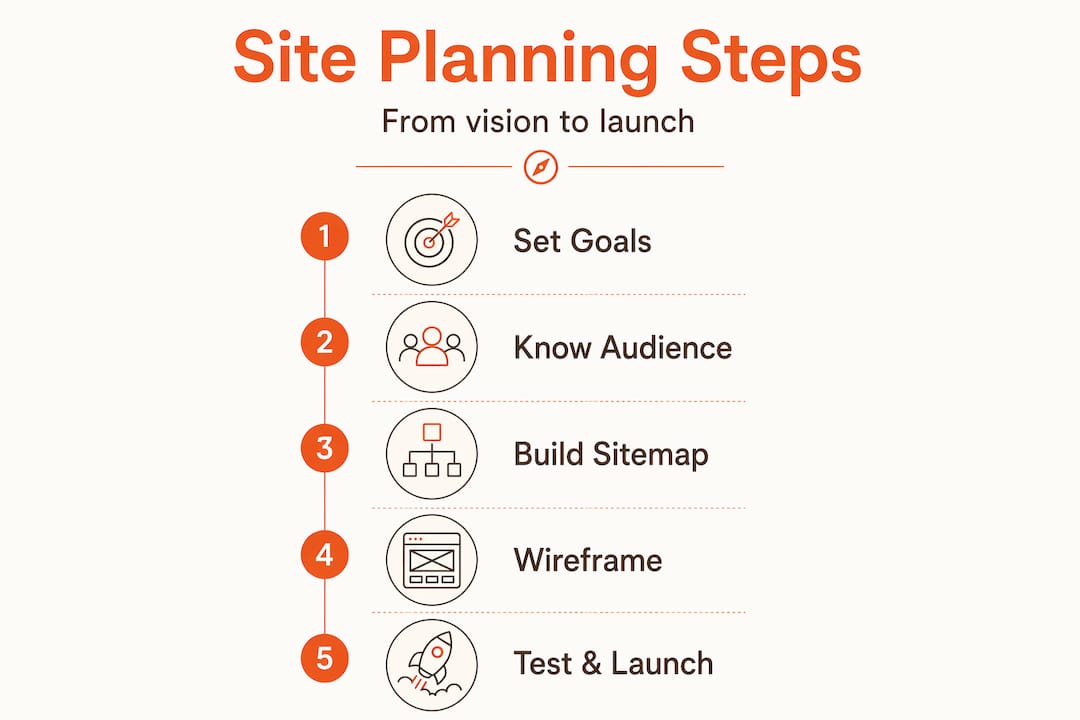
Before you pick a color palette or write a single headline, you need to know what your site is supposed to accomplish. Defining measurable goals before deciding on pages and features is the single most important step in the entire process. Without that clarity, every decision that follows is a guess.
Your goals will fall into a few clear categories:
- Lead generation: You want visitors to fill out a contact form, request a quote, or book a call. Your architecture should prioritize clear paths to those conversion points.
- eCommerce sales: Product pages, category structures, and checkout flows all depend on a well-organized hierarchy. A disorganized product catalog is one of the fastest ways to lose a sale.
- Brand building: You want visitors to understand who you are and why you are the right choice. Content pages, case studies, and about sections carry that weight.
- SEO growth: You want search engines to find, crawl, and rank your pages. Your architecture directly affects how well that happens.
Once your goals are clear, you need to understand your audience. Build at least one or two buyer personas. A persona is a realistic profile of your ideal customer, including what they are searching for, what questions they have, and what would make them trust you enough to take action. A service business targeting local contractors needs a very different site structure than a software startup targeting HR managers.
Sitemap and wireframes are essentially your site’s blueprint.
With goals and audience defined, you can build your sitemap. A sitemap is a hierarchical diagram showing every page on your site and how those pages relate to each other. A wireframe is a rough sketch of what each individual page will look like, including where the headline goes, where the call to action sits, and how the navigation appears.
These are two distinct deliverables. Conflating sitemap and wireframe deliverables causes misalignment and functional issues during the build. Treat them as separate strategic tools, not interchangeable documents.
Here is a comparison of what each one does and why you need both:
| Tool | What it shows | Primary benefit |
|---|---|---|
| Sitemap | Page hierarchy and relationships | Clarifies structure, prevents orphan pages, guides navigation |
| Wireframe | Page layout and content placement | Validates user journey, prevents costly design rework |
When building your sitemap, the most important structural rule is shallow depth. All important pages should be reachable within about three clicks from the homepage, with hierarchy no deeper than three levels. This improves findability for users and crawlability for search engines.
A typical small business sitemap might look like this:
- Level 1 (Homepage): The entry point for most visitors
- Level 2 (Core pages): Services, About, Blog, Contact, Shop
- Level 3 (Sub-pages): Individual service pages, team bios, product categories
- Level 4 (Avoid if possible): Deep product pages or archived posts
Wireframes come after the sitemap is approved. Wireframes validate user journeys and page skeletons before visual design begins, which prevents navigation confusion and costly rework later. For each key page, sketch out where the hero section lives, where the primary call to action appears, and how the navigation is positioned. You do not need software for this. A whiteboard or paper works fine at this stage.

Navigation and URL structure best practices.
Good navigation design is one of the most underestimated parts of website structure planning. Keep navigation menus to five to seven main items to reduce cognitive overload and keep users oriented. More than that, and visitors start skipping items rather than reading them.
A few principles to follow when designing your navigation:
- Use plain, descriptive labels. “Services” beats “What We Do” every time for clarity and SEO.
- Add breadcrumb navigation on interior pages so users always know where they are in the site hierarchy.
- Make sub-menu indicators obvious. Navigation should be designed so users can guess menus and sub-menus correctly on the first try, which is especially important for accessibility.
- Keep the navigation consistent across every page. Changing the menu structure between sections of your site creates disorientation.
Your URL structure deserves the same attention. URLs should mirror your sitemap hierarchy and stay simple and descriptive. A URL like yoursite.com/services/web-design tells both users and search engines exactly where they are. A URL like yoursite.com/page?id=47 tells nobody anything.
Clean, hierarchical URLs improve crawl efficiency measurably. Search engines use URL structure as one signal for understanding page relationships and site organization. Pair that with a deliberate internal linking strategy and you give search engines a clear map of your site while also distributing authority to your most important pages. Poor site architecture wastes crawl budget and dilutes link equity. Internal linking is one of the most overlooked ways to fix that.
Planning for scalability and growth.
Most new businesses launch with a small site and expect to grow. The problem is that growth without a plan creates structural debt. You add a blog, then a resources section, then a podcast page, and suddenly your site is four or five levels deep with no clear organization. Users get lost. Search engines get confused. You end up needing a full rebuild.
Here is how to prevent that from the start:
- Set a governance rule for click depth. Enforce shallow structure as a governance constraint when adding new content. Before publishing any new page, ask: how many clicks does it take to reach this from the homepage? If the answer is more than three, restructure before you publish.
- Use reusable page templates. Component-based information architecture reduces maintenance burden and prevents navigation complexity from growing as your business scales. Build a service page template, a blog post template, and a landing page template. Apply them consistently.
- Plan for a hybrid architecture. A hybrid model combining hierarchical core pages with hub-and-spoke topic clusters works well for businesses that plan to publish blog or resource content. Your core pages (Home, Services, About, Contact) stay fixed. Your content expands in organized clusters around topics relevant to your audience.
- Document your architecture decisions. Write down your sitemap logic, your URL naming conventions, and your navigation rules. When you hire a content writer or a new developer six months from now, that document saves hours of confusion and prevents structural drift.
Growth planning is not about predicting every page you will ever need. It is about building a structure flexible enough to absorb new content without breaking what already works.
Testing, launching, and optimizing after launch.
A well-planned architecture still needs to be verified before and after launch. Testing is not optional. It is the step that catches the gaps between what you planned and what actually got built.
Before you go live, work through this checklist:
- Test navigation across devices. Open your site on a desktop, a tablet, and a phone. Click every menu item. Confirm that dropdowns work, that labels are readable, and that nothing overlaps or breaks on smaller screens.
- Check page load speed. Pages that take more than three seconds to load see significantly higher abandonment rates. Use a free tool like Google PageSpeed Insights to identify slow pages before they cost you visitors.
- Verify internal links. Click through your internal links to confirm none of them point to missing or incorrect pages. Broken links hurt both user experience and SEO.
- Submit your sitemap to Google Search Console. This tells Google exactly what pages exist on your site and prompts faster indexing. It also surfaces crawl errors you may not have noticed.
- Check for orphan pages. An orphan page has no internal links pointing to it. Search engines may never find it, and users certainly will not. Every page on your site should be linked from at least one other page.
After launch, treat your architecture as a living system. Review your analytics monthly for the first six months. If users are consistently dropping off on a specific page, that is a signal about navigation or content placement, not just design. Adjust your internal linking, reorder your navigation items, or consolidate thin pages into stronger ones. The website redesign checklist from Expedition is a useful reference even for new sites, since many of the same structural principles apply.