Want to know how much your website project would cost?

How to Improve Website Speed: 2026 Guide

Devices for website speed testing on desk

Website speed is defined as the time it takes for a browser to fully load and display your web page content. Knowing how to improve website speed is one of the highest-return investments you can make for your site. Slow pages cost you visitors, search rankings, and revenue. Google’s Core Web Vitals framework measures speed through metrics like Largest Contentful Paint (LCP), Cumulative Layout Shift (CLS), and Interaction to Next Paint (INP). Before you change a single line of code, you need a baseline measurement. Systematic measurement before optimization prevents wasted effort and keeps you focused on changes that actually move the needle.

What are the key tools and metrics for measuring website speed?

The right tools tell you exactly where your site is losing time. Without them, you are guessing. Google PageSpeed Insights, HubSpot Website Grader, and DebugBear each analyze your pages and surface specific bottlenecks you can act on.

The four metrics that matter most are:

  • Time to First Byte (TTFB): How long the browser waits before receiving the first byte of HTML from your server. A slow TTFB delays everything else on the page.
  • Largest Contentful Paint (LCP): The time it takes for the largest visible element, usually a hero image or headline, to fully render. Google targets under 2.5 seconds.
  • Cumulative Layout Shift (CLS): Measures visual stability. A high CLS score means elements are jumping around as the page loads, which frustrates visitors.
  • Interaction to Next Paint (INP): Replaced First Input Delay in 2024. It measures how quickly your page responds to user clicks and taps.

Run your URL through Google PageSpeed Insights first. It scores your page on both mobile and desktop and groups issues by impact level: high, medium, and low. Fix the high-impact items first. DebugBear adds timeline waterfall charts that show exactly which resources are blocking your page from loading. Use both tools together to get a complete picture before you start making changes.

Pro Tip:

Test your site on a throttled mobile connection in Google PageSpeed Insights. Most of your visitors are on mobile, and desktop scores can be misleadingly high.

How can image optimization improve your website speed?

Images are the single largest contributor to page weight on most websites. Optimizing LCP images yields the highest-impact speed gains of any front-end technique. A single uncompressed hero image can add two or more seconds to your load time.

The most effective image techniques are:

  • Convert to WebP or AVIF: These modern formats deliver the same visual quality as JPEG or PNG at a fraction of the file size. AVIF compresses even smaller than WebP, though browser support is still catching up.
  • Compress before uploading: Tools like Squoosh, TinyPNG, and ShortPixel reduce file sizes without visible quality loss. Aim for images under 200KB wherever possible.
  • Resize images to their display dimensions: Uploading a 3,000-pixel-wide image that displays at 800 pixels forces the browser to download far more data than it needs.
  • Use lazy loading for below-the-fold images: Add the loading="lazy" attribute to images that appear below the visible screen area. The browser skips them on initial load and fetches them only as the visitor scrolls.
  • Set fetchpriority="high" on your LCP image: This tells the browser to prioritize downloading your most important above-the-fold image immediately, which directly improves your LCP score.

One detail most site owners miss: lazy loading your LCP image actually hurts performance. The browser needs to load that image as fast as possible. Reserve lazy loading strictly for images that appear further down the page.

Pro Tip:

In WordPress, the Imagify or ShortPixel plugins automate WebP conversion and compression on upload, so you never have to think about it again.

Workspace with devices for image optimization

What technical strategies reduce loading delays and improve resource delivery?

Every extra file your page requests adds a round trip between the browser and your server. Fewer HTTP requests and minimized redirects cumulatively improve page speed in ways that compound quickly.

  1. Reduce HTTP requests. Combine CSS files where possible. Inline small JavaScript snippets instead of loading separate files. Remove any scripts or stylesheets that are no longer in use.
  2. Eliminate unnecessary redirects. Each redirect adds a full round trip before the browser gets any content. Audit your site for redirect chains, where one URL redirects to another, which redirects again.
  3. Enable browser caching. When a returning visitor loads your page, their browser can serve static files like logos, fonts, and CSS from local storage instead of re-downloading them. Browser caching reduces load time for repeat visitors significantly.
  4. Minify CSS, JavaScript, and HTML. Minification strips out whitespace, comments, and redundant characters from your code files. Minifying code files reduces their size without changing how they function.
  5. Use a Content Delivery Network (CDN). A CDN stores copies of your static files on servers around the world. A visitor in Phoenix gets files from a nearby server instead of one in New York. Services like Cloudflare and Fastly make CDN setup straightforward for most WordPress sites.
TechniquePrimary benefitDifficulty
Image compressionReduces page weightLow
Browser cachingSpeeds repeat visitsLow
Minify CSS/JS/HTMLReduces file sizesLow
Reduce HTTP requestsFewer server round tripsMedium
CDN implementationFaster global deliveryMedium
Eliminate redirectsRemoves load delaysMedium

Pro Tip:

Cloudflare’s free plan handles CDN, basic caching, and minification in one place. For most small business sites, it is the fastest way to boost site performance without touching your server configuration.

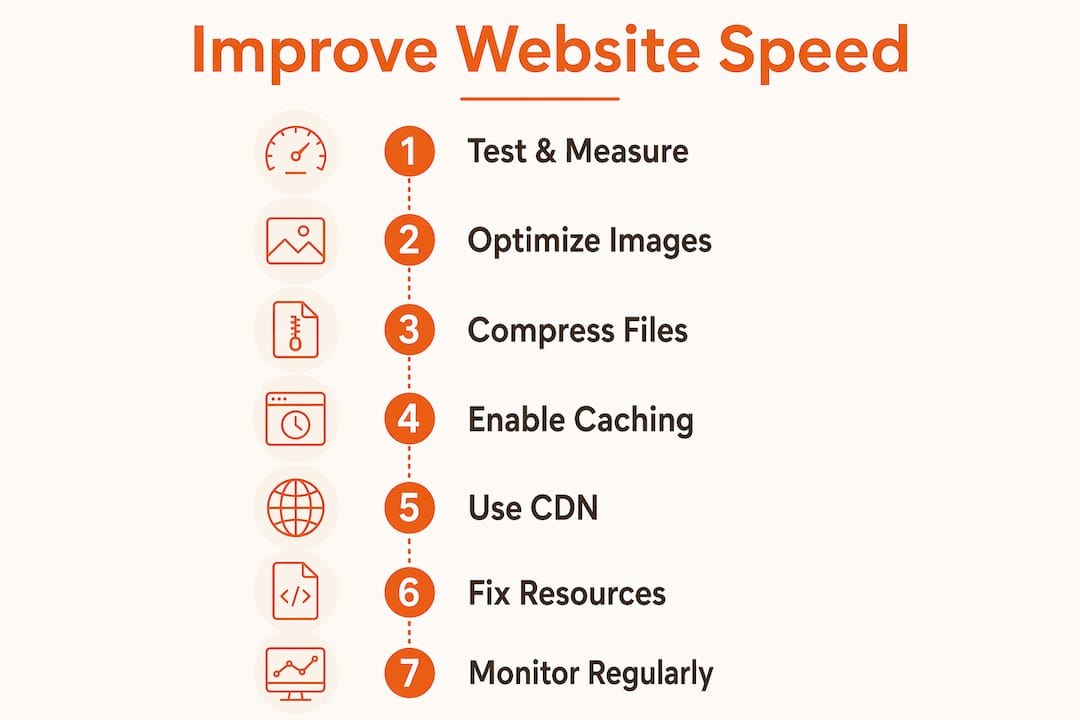
Infographic with steps to improve website speed

How to improve server response time and fix render-blocking resources.

Server response time and front-end speed are two separate problems. A slow server TTFB is a root cause that no amount of front-end optimization can fix. The browser cannot start rendering anything until it receives the first byte of HTML.

Strategies to reduce TTFB and clear the rendering path include:

  • Upgrade your hosting. Shared hosting plans often place hundreds of sites on one server. Moving to a managed WordPress host or a VPS with dedicated resources cuts TTFB dramatically.
  • Enable server-side caching. Plugins like WP Rocket or W3 Total Cache generate static HTML files from your dynamic WordPress pages. The server delivers a pre-built file instead of running PHP and database queries on every request.
  • Configure your CDN for HTML caching. Most CDNs cache static assets by default, but you can also cache full HTML pages for logged-out visitors, which reduces server load further.
  • Defer or async non-critical JavaScript. Scripts loaded in the <head> of your HTML block the browser from rendering the page until they finish downloading and executing. Adding the defer attribute tells the browser to download the script in the background and run it after the HTML is parsed. The async attribute works similarly but executes as soon as the script downloads.
  • Remove render-blocking CSS. Load only the critical CSS needed for above-the-fold content inline. Defer the rest using a <link rel="preload"> tag.

Unblocking the critical rendering path by addressing server response and render-blocking resources together produces the greatest speed gains per hour of work invested. Tackling one without the other leaves significant performance on the table.

What ongoing practices keep your website speed at its best?

A one-time speed audit is not enough. Continuous audits and maintenance are required because plugins update, new images get uploaded, and third-party scripts accumulate over time.

Build these habits into your regular site maintenance:

  • Run monthly performance audits. Schedule a recurring Google PageSpeed Insights check and track your LCP, CLS, and INP scores over time. A sudden drop signals a new problem.
  • Audit and remove unused plugins. Every active plugin adds PHP execution and often extra CSS or JavaScript. Deactivate and delete anything your site does not need.
  • Review third-party scripts quarterly. Chat widgets, analytics tags, and ad pixels all add load time. Confirm each one is still earning its place.
  • Update WordPress core, themes, and plugins regularly. Updates often include performance improvements and security patches. Outdated code is both slower and less secure.
  • Incorporate speed checks into redesigns. When you update your site’s design or add new sections, re-test performance before publishing. New page builders and block patterns can introduce unexpected weight.

Prioritizing LCP assets, render-blocking resources, and caching in every redesign cycle keeps your site performing well without requiring a full audit from scratch each time. Speed is not a project you finish. It is a standard you maintain.

Key Takeaways:

The fastest websites combine server-level improvements, image optimization, and ongoing monitoring because no single fix sustains performance on its own.

PointDetails
Measure before you fixUse Google PageSpeed Insights and DebugBear to identify bottlenecks before making any changes.
Images are the biggest winConvert to WebP, compress files, and set fetchpriority on your LCP image for the fastest gains.
Server speed is foundationalNo front-end optimization compensates for a slow TTFB; upgrade hosting or enable server-side caching first.
Technical cleanup compoundsMinifying code, enabling browser caching, and using a CDN each add small gains that stack up significantly.
Speed requires ongoing attentionMonthly audits and plugin reviews prevent performance from degrading between major site updates.
From the Founder:

What I’ve learned from watching fast sites stay fast and slow sites die over time.

Speed work has a dirty secret: most site owners do the hard technical work once, then watch their scores slowly erode over the next 12 months. A new plugin here, an uncompressed image there, a third-party chat widget added without a second thought. By the time they run another audit, the gains are gone.

The sites I’ve seen hold their performance over time share one habit. They treat speed as part of their publishing workflow, not a separate technical project. Every new image gets compressed before upload. Every new plugin gets evaluated for its performance cost. Every redesign starts with a speed baseline, not a visual brief.

The other thing I’d push back on is the instinct to start with the most complex fixes. Render-blocking JavaScript and CDN configuration sound impressive, but a single unoptimized hero image often does more damage than all of them combined. Start with image optimization and server caching. Those two areas alone will move your scores more than anything else on the list.

If you are running a WordPress site and your LCP is above 4 seconds, I’d bet money the problem is either your hosting tier or an uncompressed above-the-fold image. Fix those two things before touching anything else. The technical elegance of async script loading matters far less than the basics done right.

- Bradley Givens, Co-Founder & Creative Director

How Expedition builds sites that stay consistently fast and optimized.

Speed is not a feature Expedition adds after a site is built. It is part of how every custom WordPress site gets designed and developed from the start. That means proper image pipelines, caching configuration, CDN setup, and clean code without the plugin bloat that slows most WordPress sites down. For businesses that already have a site but need better performance, Expedition’s website redesign services include a full technical audit and targeted fixes built into the rebuild. The same in-house team that builds the site handles ongoing website maintenance, so performance does not degrade between updates.

FAQ

What is a good website load time to target?

Google recommends an LCP under 2.5 seconds for a good user experience. Aim for a TTFB under 800 milliseconds as your server response baseline.

How does website speed affect SEO rankings?

Page speed is a confirmed Google ranking factor, and Core Web Vitals scores directly influence search visibility. Faster sites also reduce bounce rates, which signals quality to search engines.

What is the fastest way to speed up a WordPress site?

Enable server-side caching with a plugin like WP Rocket, compress and convert images to WebP, and add a CDN like Cloudflare. These three steps address the most common causes of slow WordPress performance.

Does website speed affect conversion rates?

Yes. Slower load times reduce the likelihood that visitors complete a purchase or fill out a form. Faster page speed directly correlates with higher conversion rates across most site categories.

How often should I audit my website speed?

Run a full performance audit at minimum once per month. Also test after any major plugin update, new page launch, or design change to catch regressions early.

In this article:

Get an estimate for your website project in minutes.

Customize your website estimate by answering a few quick questions. Get instant pricing with no commitment.

No email required!

Continue Reading

Team in web design discovery meeting

The Benefits of Integrated Design and Development Services

Read More
Founder sketching brand ideas at desk

In-House Hire vs. Outsourcing Design and Development: Making The Right Choice

Read More
Woman browsing ecommerce on smartphone at home

Responsive Web Design: Why Is It Important?

Read More